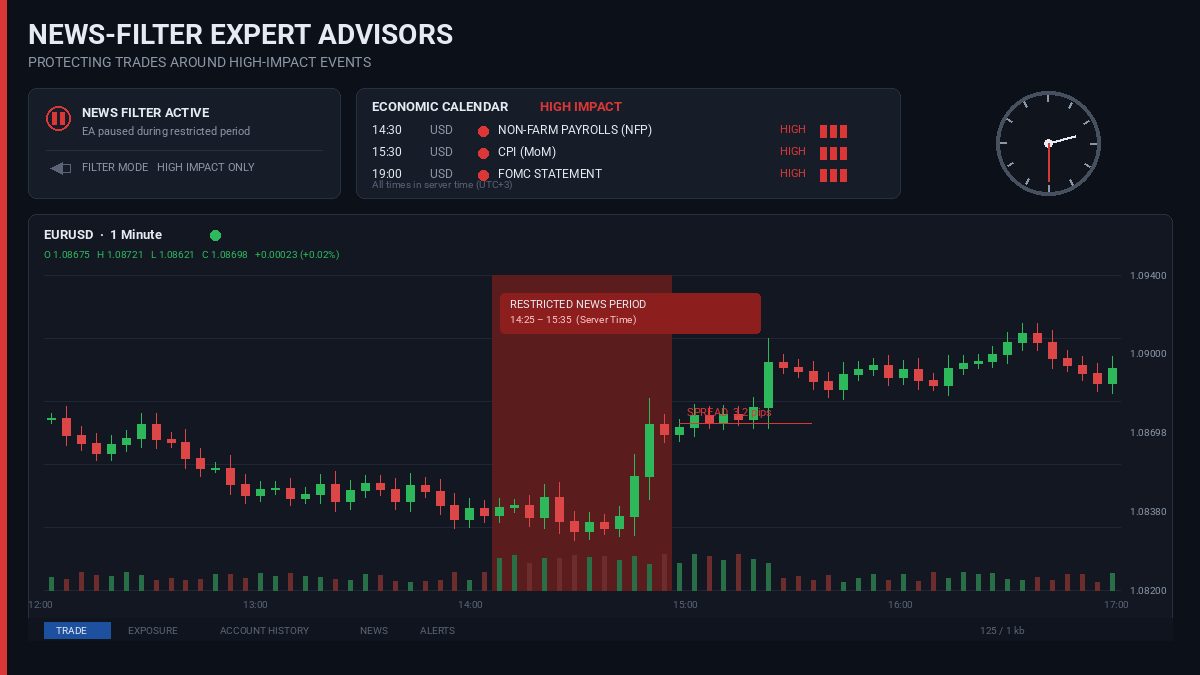
Building effective News Filter EAs is essential if you want to protect your trades from extreme market conditions. If you’ve run an Expert Advisor through enough live trading, you’ve probably seen this happen before…
A major release hits. NFP, CPI, an interest-rate decision—take your pick. The spread jumps, price moves 30 or 40 pips almost instantly, and a position that looked perfectly normal a few seconds earlier is suddenly stopped out. Sometimes the stop is hit by a spike and price immediately comes back. Other times the EA gets filled at a price that would never have appeared during normal trading.
The strategy itself may not be the problem.
The problem is that the market around major news is a very different market from the one the EA was designed to trade.
That’s why news filters are useful. But a news filter EAs needs to do more than compare the current time with a list of release times. If the implementation is too simple, it can still leave the EA exposed to exactly the conditions it was supposed to avoid.
What a news filter EAs actually needs to handle
The basic rule is simple: don’t let the EA open new exposure when a major economic release is likely to disrupt normal market conditions.
Getting that rule right involves more than knowing the release time.
The EA needs reliable calendar data, a sensible definition of the restricted period, and a way to determine whether the event is relevant to the instrument being traded. It also needs to decide what happens to trades that are already open and to pending orders that could be triggered during the release.
Those decisions are part of the filter. They shouldn’t be left to whatever happens to be the default behaviour of the trading logic.
Where does the calendar data come from?
There are three common approaches.
Hardcoded release times
For a quick personal EA, hardcoded times can be enough.
For example, a developer might simply tell the EA that NFP occurs at a particular time on the first Friday of the month and block trading around it.
That approach becomes difficult to maintain very quickly. Economic releases can be moved, holidays can change schedules, and a commercial EA may be used on symbols and accounts that weren’t considered when the original list was created.
A hardcoded calendar is therefore better treated as a temporary solution than as the foundation of a robust news filter.
MT5’s economic calendar
For an MT5 EA, the built-in economic calendar is generally the most convenient starting point.
Functions such as CalendarValueHistory() and CalendarEventById() provide access to calendar events without requiring a separate web service.
There is still some work involved. The EA needs to handle event times correctly, determine which currencies matter for the current symbol, and decide how the calendar’s importance classification maps to the strategy’s own definition of “high impact.”
Time handling deserves particular attention. An EA running on a broker’s server should not simply assume that the calendar time can be compared with a locally calculated time without checking the relevant time basis.
External calendar services
MT4 doesn’t have the same native economic-calendar functionality, so external data is normally required.
An EA can retrieve calendar information through WebRequest() from a suitable API, or a separate process can download the information and make it available to the EA through a file or bridge.
This works, but it introduces additional failure points. The connection can fail, the API can impose limits, authentication can expire, or the provider can change its response format.
Whatever source is used, don’t query it on every tick.
A better design is to load the relevant events into memory and refresh them periodically. The EA can then perform its news checks locally on each tick without repeatedly contacting an external service.
It is both faster and much easier to control.
Five minutes before and after isn’t a universal answer
One of the most common news-filter settings is something like:
Stop trading five minutes before news and resume five minutes afterwards.
There’s nothing inherently wrong with that setting. The problem is assuming that it is suitable for every event.
It isn’t.
An NFP release can produce extreme volatility well beyond the first few seconds. An FOMC rate decision may be followed by a statement or press conference that keeps the market moving. A smaller economic release may have almost no effect on the instrument.
The EA should therefore allow the restriction to vary according to event importance and the trading strategy.
For example:
int GetPauseMinutes
(ENUM_CALENDAR_EVENT_IMPORTANCE impact)
{
   switch(impact)
   {
      case CALENDAR_IMPORTANCE_HIGH:
         return 15;

      case CALENDAR_IMPORTANCE_MODERATE:
         return 5;

      default:
         return 0;
   }
}
Those values are examples, not recommended universal settings.
A short-term scalper may need a much more conservative window than a swing EA whose normal holding period is several hours or days.
There is also an important difference between the period before an event and the period after it. The same number of minutes does not necessarily make sense on both sides.
The spread can tell you when the market is already becoming abnormal
The economic calendar only tells you what is scheduled.
It doesn’t tell you exactly when liquidity conditions start deteriorating.
Around major releases, spreads can widen before the actual announcement. Liquidity providers may reduce their exposure, and the result can be a market that is already expensive to enter even though the clock hasn’t reached the official release time.
That is why a spread check is useful as a second layer.
For example:
bool IsSpreadSafe(string symbol, double maxSpreadPoints)
{
   double ask = SymbolInfoDouble(symbol, SYMBOL_ASK);
   double bid = SymbolInfoDouble(symbol, SYMBOL_BID);
   double point = SymbolInfoDouble(symbol, SYMBOL_POINT);

   if(ask <= 0 || bid <= 0 || point <= 0)
      return false;

   double spreadPoints = (ask - bid) / point;

   return spreadPoints <= maxSpreadPoints;
}
The maxSpreadPoints value should be an EA setting rather than an arbitrary number buried in the code.
For some strategies, it can be a fixed maximum. For others, it may make more sense to compare the current spread with the instrument’s normal spread and allow trading only while it remains within an acceptable multiple of that baseline.
The two checks can then work together:
bool NewsBlockActive(string symbol)
{
   if(IsWithinEventWindow(symbol))
      return true;

   if(!IsSpreadSafe(symbol, MaxSpreadPoints))
      return true;

   return false;
}
This is useful because not every dangerous market condition comes with a calendar entry.
A surprise central-bank comment, geopolitical headline, or sudden liquidity problem won’t necessarily appear in the EA’s calendar data. A spread check gives the EA a chance to react to what the market is actually doing.
Don’t block every pair because of every USD event
Currency relevance is another area where simple filters often go too far.
Suppose the EA trades EURJPY. If the filter blocks trading around every high-impact US event, the EA may spend time out of the market even when the event has little direct relevance to the pair.
For a straightforward FX implementation, the event currency can be compared with the base and quote currencies of the symbol:
bool EventAffectsSymbol(string eventCurrency, string symbol)
{
   string base  = StringSubstr(symbol, 0, 3);
   string quote = StringSubstr(symbol, 3, 3);

   return (eventCurrency == base ||
           eventCurrency == quote);
}
This is only a simplified example.
Broker symbols aren’t always exactly six characters. You can encounter names such as EURUSD.a, EURUSDm, or other broker-specific formats. And once the EA starts trading indices, metals, or other CFDs, the simple base/quote extraction no longer applies.
For a production EA, symbol-to-currency mapping should therefore be handled explicitly rather than assuming every symbol follows the six-character FX format.
The underlying idea remains the same: a high-impact event should be evaluated in the context of the instrument being traded.
The filter doesn’t automatically protect existing trades
This is where the design gets more interesting.
Suppose an EA is already holding EURUSD when an important US release is approaching. The news filter blocks new entries, but the existing position is still open.
What should happen?
There are several reasonable answers.
Close before the release
The EA can close the position before the restricted period starts.
This gives the strategy a very clear exposure limit around news, but it also means the trade may be closed just before a move that would have been profitable.
If positions are closed this way, the EA also needs a sensible re-entry policy. Otherwise, closing the trade is easy but getting back into the strategy afterwards becomes a separate problem.
Leave the position open
This may be perfectly reasonable for a strategy that is designed to hold positions through normal volatility.
A swing trade with a wide stop may not care about a short-lived 20-pip spike in the same way a scalping EA does.
Change the risk-management behaviour
Some strategies may use different trade-management rules around major releases.
For example, a developer might choose to reduce exposure or modify certain management rules.
Automatically widening a stop loss, however, needs to be treated carefully. It can keep a position alive through a temporary spike, but if the news move continues, the larger stop also means a larger potential loss.
There isn’t one correct policy for every EA. The important thing is that the policy is intentional and configurable.
A news filter that only blocks new orders doesn’t answer the risk question for positions that are already in the market.
Pending orders can defeat an otherwise good filter
This is an easy one to miss.
Imagine an EA has placed a Buy Stop above the market and a Sell Stop below it. The news filter activates a few minutes later, but those pending orders are still sitting there.
When the release hits, one of them can be triggered during the volatility the filter was designed to avoid.
So pending orders need their own policy.
Depending on the strategy, the EA can:
- cancel them before the restricted period;
- leave them active intentionally; or
- prevent new pending orders from being created during the news window.
The right choice depends on why the pending orders exist in the first place. A breakout strategy may intentionally want them around a scheduled event, while another strategy may want them removed completely.
Check again immediately before sending the order
There is another small implementation detail that can matter in live trading.
The EA may check the news filter, calculate an entry, perform its risk checks, and then finally send the order. If the market is changing rapidly, the conditions at the final order-submission step may no longer be the same as they were when the first check was made.
For that reason, the final news and spread checks should happen as close as practical to the actual order submission.
This doesn’t eliminate execution risk—nothing in an EA can guarantee that—but it reduces the chance of deliberately sending an order after the market has already entered the restricted conditions.
The same thinking should be applied to pending-order placement.
What happens if the calendar data is unavailable?
This is an important design decision that is often overlooked.
Suppose an MT4 EA relies on an external calendar service and the request fails. Or the EA’s cached calendar is several hours old.
Should it continue trading?
If the filter is considered an important risk-control component, blindly continuing as though there were no news events is usually not a good default.
The EA should be able to detect stale or unavailable calendar data and follow a defined fallback policy. Depending on the strategy, that could mean temporarily blocking new entries until valid data is available, or continuing with a separate spread/volatility safeguard.
The important thing is that a failed calendar request should not silently turn the news filter off.
Don’t expect the Strategy Tester to reproduce a live news event
News filters are particularly difficult to validate using historical testing alone.
The tester can tell you whether your code correctly recognised a scheduled event and blocked an entry. That’s useful.
What it may not reproduce accurately is the exact spread widening, liquidity reduction, execution delay and slippage that occurred during the real release.
The historical tick data also comes from a particular data source. It won’t necessarily reproduce the conditions of the broker where the EA will eventually run.
So I would use backtesting mainly to verify the filter logic:
- Is the event detected?
- Is the event currency matched correctly?
- Does the restricted period start and finish when expected?
- Are existing positions handled according to the configured policy?
- Are pending orders treated correctly?
- What happens when calendar data is missing?
Then move to forward testing.
Run the EA on a demo account through several major releases and watch the actual behaviour around the release time. NFP, CPI and FOMC events are particularly useful because they expose problems that may never appear during ordinary market conditions.
A practical way to think about the filter
A useful news filter isn’t one feature. It’s a collection of safeguards working together.
At minimum, I would want an EA to have:
- a reliable calendar source;
- proper event-time handling;
- currency relevance filtering;
- configurable before/after windows;
- a live spread check;
- a policy for existing positions;
- a policy for pending orders;
- a final check immediately before order submission;
- protection against stale or unavailable calendar data;
- forward testing around actual high-impact releases.
If the EA has only a hardcoded list of times and a five-minute timer, it technically has a news filter. That doesn’t necessarily mean it has adequate protection from news-driven trading conditions.
The takeaway
News filtering is one of those EA features that looks simple until it has to deal with a real market.
The calendar tells the EA when something is scheduled, but it doesn’t tell the whole story. Spreads can widen before the release. An event may affect one currency much more than another. Pending orders can still be triggered. Existing positions remain exposed. And a failed calendar request can leave the EA making decisions with stale information.
A more robust implementation combines the calendar with live market-condition checks and a clearly defined risk policy.
And it needs to be tested outside the strategy tester as well. A backtest can confirm that the EA knows a news event exists. It cannot fully reproduce what happens when liquidity thins out and the spread suddenly goes several times wider than normal.
If you’re unsure whether your EA’s current news filter is actually covering these areas, it’s worth checking before the next major release. These are some of the implementation gaps we look for in our free EA diagnosis.