
Automated trading is only as reliable as the code behind it. While a well-designed Expert Advisor (EA) can identify trading opportunities and execute orders automatically, its true strength lies in how it responds when things don’t go as planned. Live trading environments are unpredictable, and issues such as requotes, network interruptions, invalid trade requests, or broker restrictions can occur at any time.
Without proper error handling, these situations may result in missed trades, repeated order submissions, or even unexpected losses. That’s why robust error handling is a fundamental part of professional Expert Advisor development in both MQL4 and MQL5.
Why Error Handling Matters
Unlike manual traders who can react to unexpected situations, an EA operates without human intervention. If a trade request fails and the program ignores the error, the trading strategy may stop functioning correctly or continue making incorrect decisions.
A reliable Expert Advisor should be designed to:
- Detect execution errors
- Record meaningful logs for debugging
- Retry operations when appropriate
- Continue running without crashing
- Notify users when critical issues occur
By anticipating potential failures, developers can create EAs that remain stable even during challenging market conditions.
Common Trading Errors in MQL4 and MQL5
Understanding the most common execution errors is the first step toward building resilient automated trading systems.
Requotes
A requote occurs when the market price changes before the broker executes the trade. This is common during volatile market conditions and can cause order requests to fail.
Slippage
Slippage happens when an order is executed at a price different from the requested price due to rapid market movement. While small amounts of slippage are normal, excessive slippage can affect trading performance.
Invalid Trade Parameters
Incorrect lot sizes, invalid stop-loss or take-profit values, or prices that violate broker rules will cause the broker to reject the order.
Trade Context Busy
If multiple trading operations are attempted simultaneously, the trading terminal may return a Trade Context Busy error, preventing execution until the previous operation completes.
Connection or Server Errors
Temporary internet outages, broker server maintenance, or communication failures can interrupt trade execution and require the EA to respond appropriately.
Recognizing these scenarios allows developers to build Expert Advisors that respond intelligently instead of simply failing.
Example Scenario
Imagine an Expert Advisor attempts to open a trade during a major news release. The broker returns a requote because the market price changes rapidly.
Instead of immediately giving up, a well-designed EA checks the error, retrieves the updated market price, verifies that trading conditions are still valid, and resubmits the order if appropriate. If the issue persists, it records the failure in the log and continues monitoring the market without disrupting the rest of the strategy.
This approach helps prevent missed opportunities while avoiding unnecessary duplicate orders.
Using Error Codes Effectively
Both MQL4 and MQL5 provide tools for identifying why a trading operation failed.
In MQL4, the GetLastError() function helps identify why a trading operation failed.
int ticket = OrderSend(Symbol(), OP_BUY, 0.10, Ask, 3, 0, 0, "Buy Order", 0, 0, clrBlue);

if(ticket < 0)
{
   int error = GetLastError();
   Print("OrderSend failed. Error Code: ", error);
}
else
{
   Print("Order placed successfully. Ticket: ", ticket);
}
Checking the returned ticket and logging the error code makes troubleshooting much easier during testing and live trading.
In MQL5, additional execution details are available through structures such as MqlTradeResult.
MqlTradeRequest request;
MqlTradeResult result;

ZeroMemory(request);
ZeroMemory(result);

// Populate the request structure here...

if(!OrderSend(request, result))
{
   Print("Trade request failed.");
}
else
{
   if(result.retcode == TRADE_RETCODE_DONE)
      Print("Trade executed successfully.");
   else
      Print("Trade rejected. Retcode: ", result.retcode);
}
Using result.retcode provides more detailed feedback about the outcome of each trade request and allows the EA to respond appropriately.
Rather than ignoring these errors, developers should:
- Record error codes in log files.
- Display meaningful messages for troubleshooting.
- Determine whether the operation should be retried or safely abandoned.
Proper logging significantly reduces debugging time and simplifies long-term maintenance.
Error Handling Workflow
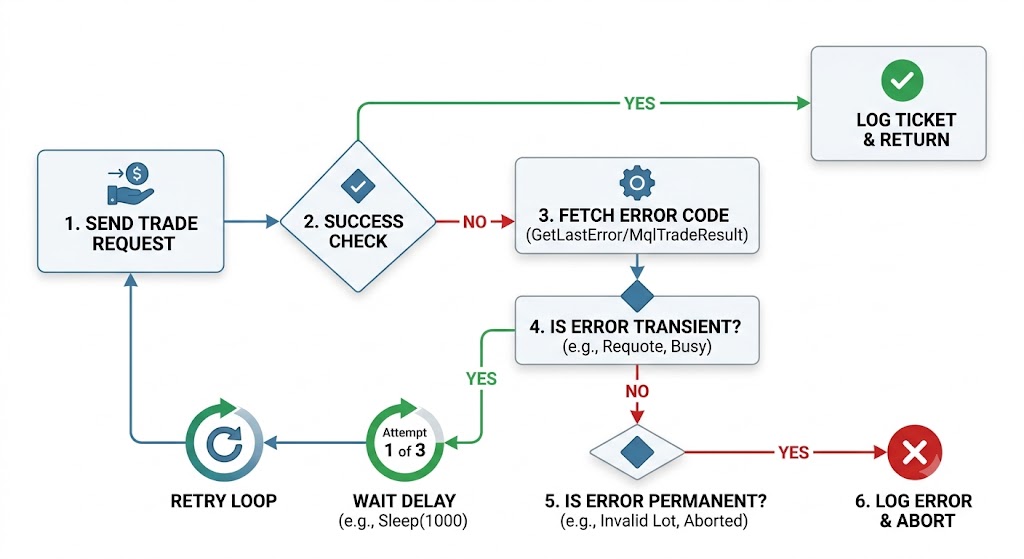
Once an Expert Advisor detects a trading error, it should follow a structured process to determine the appropriate response. A proper workflow helps maintain stability, prevents unnecessary retries, and allows the EA to recover from temporary problems without interrupting normal operations.
- Submit the trade request
The EA sends the order request to the broker. - Check the execution result
Verify whether the trade was successfully accepted or rejected. - Identify the error
Retrieve the error code usingGetLastError()in MQL4 or checkretcodeinformation throughMqlTradeResultin MQL5. - Classify the error
Determine whether the issue is temporary (such as requotes or connection problems) or permanent (such as invalid trade parameters). - Apply the appropriate action
Retry temporary failures when suitable, or correct the issue before sending another request. - Record the event
Store error details in logs to help with debugging and future improvements. - Continue normal operation
The EA should recover gracefully and continue monitoring the market without crashing.
Best Practices for Building Reliable Expert Advisors
Effective error handling involves much more than checking return values. A professionally developed EA should include several layers of protection.
Retry Logic
Temporary execution issues such as requotes or trade context problems may be resolved by retrying the operation after a short delay. A controlled retry mechanism can help improve reliability while avoiding unnecessary repeated requests.
bool success = false;

for(int attempt = 1; attempt <= 3; attempt++)
{
   int ticket = OrderSend(Symbol(), OP_BUY, 0.10, Ask, 3, 0, 0);

   if(ticket > 0)
   {
      success = true;
      Print("Trade executed on attempt ", attempt);
      break;
   }

   Print("Attempt ", attempt, " failed. Error: ", GetLastError());
   Sleep(1000);
}

if(!success)
   Print("Trade could not be executed after multiple attempts.");
This example retries the trade up to three times, waiting one second between attempts using Sleep(1000). In a production Expert Advisor, retry logic should only be applied to temporary errors. Permanent issues such as invalid trade parameters should be corrected rather than repeatedly retried.
Input Validation
Before sending any order, the EA should verify that:
- Lot sizes are valid
- Stop-loss and take-profit values meet broker requirements
- Margin requirements are satisfied
- Order prices are acceptable
Preventing invalid requests reduces unnecessary execution failures.
Connection Monitoring
Before placing or modifying trades, the EA should verify that the trading terminal remains connected to the broker server. This helps avoid failed trade attempts caused by temporary network interruptions.
Risk Controls
Protective checks should prevent duplicate orders, accidental repeated executions, or conflicting trade requests that may occur after temporary failures.
Comprehensive Logging
Every important trading event—including successful orders, rejected requests, retries, and system warnings—should be recorded. Detailed logs simplify troubleshooting and help developers understand the EA’s behavior during live trading.
Quick Tips for Reliable Error Handling
- Always validate trade parameters before sending an order.
- Log every failed trade request for easier debugging.
- Retry only temporary errors such as requotes or busy trade contexts.
- Avoid infinite retry loops that may create duplicate orders.
- Test your EA under different market conditions before deploying it live
Test Before Going Live
Even the most robust error handling should be thoroughly tested before deploying an Expert Advisor on a live account.
Developers should verify how the EA performs under conditions such as:
- High market volatility
- Rapid price movements
- Variable spreads
- Temporary server interruptions
- Network connectivity issues
- Fast execution environments
Comprehensive testing helps confirm that the EA behaves predictably when real-world problems occur.
Benefits of Proper Error Handling
Investing time in robust error handling provides significant long-term advantages:
- Improved trading stability
- Reduced execution failures
- Faster debugging and maintenance
- Better protection against unexpected market conditions
- Increased confidence during live trading
Reliable automation isn’t just about generating profitable signals—it’s about ensuring those signals are executed safely and consistently.
Conclusion
Error handling is one of the most critical aspects of professional MQL4 and MQL5 Expert Advisor development. Even a highly profitable trading strategy can fail if it cannot recover from execution errors, network interruptions, or broker-related issues.
By implementing structured error handling, comprehensive logging, intelligent retry mechanisms, and thorough validation, developers can build automated trading systems that are more reliable, easier to maintain, and better prepared for real-world market conditions.
At MQLCoder, reliability is built into every Expert Advisor we develop. From robust error handling and efficient trade execution to comprehensive testing and optimization, we create custom MQL4 and MQL5 automation solutions designed to perform confidently in live trading environments.